
Creating a Quote From a Design
A design becomes a quote when it is priced against the catalog, and either a retailer or a wholesaler can build the design it starts from. This page covers who can create one and how a finished design is turned into a quote.
Create a quote from a design to turn a configured monument into a priced quote. The quote carries the configuration in the design and the price calculated from the wholesaler's catalog at the moment it is created.
Who Can Create One
Both wholesalers and retailers can create a quote from a design. A retailer configures a monument in the design tool and submits it to the wholesaler. A wholesaler can also build the design on behalf of their customer, which is what happens when a retailer calls or emails a request in rather than working in the tool.
Before You Begin
- The catalog needs the shapes, sizes, finishes, and accessories the design uses, with pricing set. A design cannot include what is not in the catalog. Wholesalers can work with Stonegate support to ensure their catalog is uploaded correctly and ready for the design tool.
- The retailer needs an active invitation to the wholesaler's account. Retailers cannot reach the design tool otherwise.
Creating the Quote
- Open a saved design, or build a new one by configuring a monument from the catalog. Building a design is covered in Creating a Design.
- Click Create Quote at the top right of the design page.
- Select the Customer the quote is for. The field is required on a wholesaler account, and retailer accounts do not see it, because a retailer can only quote for themselves.
- Enter the Quantity. The Estimated total below it is the unit price multiplied by that quantity, so it moves as the quantity changes.
- Click Create Quote in the dialog. The quote is created as a draft.
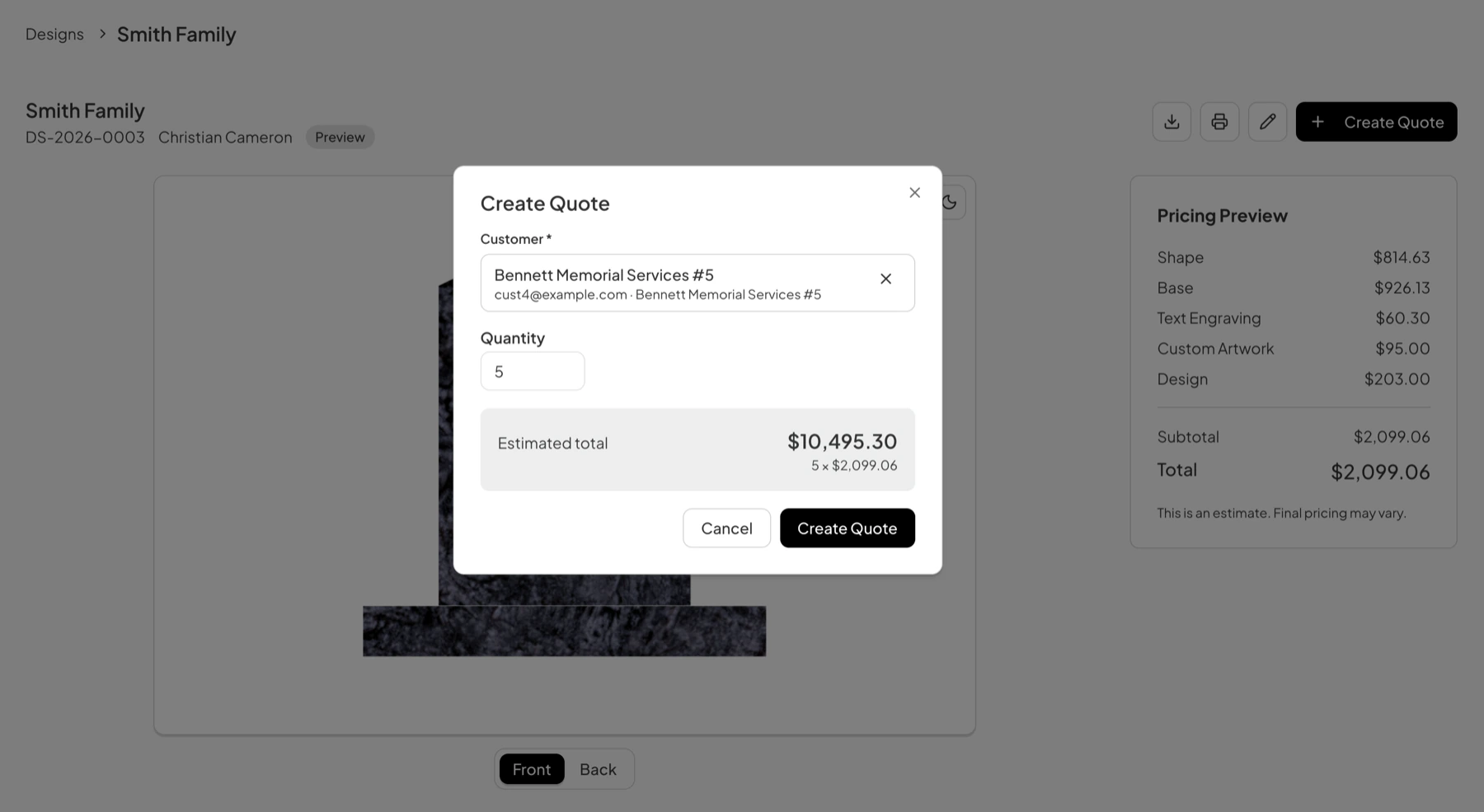
The Pricing Preview panel beside the design breaks the unit price into its parts, covering the shape, the base, text engraving, custom artwork, and the design charge. It carries the note that final pricing may vary, which holds until a wholesaler approves the quote.
Next Step
A new quote starts as a draft, and a draft goes nowhere until it is submitted. Submitting it, the wholesaler's review, and the steps that follow are covered in Quote Management.
Last updated August 1, 2026
Still need help?
If this page did not answer your question, email our support team and include your account name and what you were trying to do.